---
title: How do I claim my Adviser Ratings profile?
description: Claiming your profile is easy and free for all registered Australian financial advisers. Follow the steps below:
---
[Skip to content](https://info.adviserratings.com.au/en/knowledge/how-do-i-claim-my-free-profile#main-content)
English
Show submenu for translations
![RGB--AR\_Logo--Mark--Large--with-border.png\]](https://info.adviserratings.com.au/hs-fs/hubfs/RGB--AR_Logo--Mark--Large--with-border.png?height=50&name=RGB--AR_Logo--Mark--Large--with-border.png)
- [Adviser Ratings Support Centre](https://info.adviserratings.com.au/blog)
Open main navigation
Close main navigation
- [Adviser Ratings Support Centre](https://info.adviserratings.com.au/blog)
- English
Show submenu for translations
- Contact us
Contact us
Hello. How can we help you?
- There are no suggestions because the search field is empty.
1. [Adviser Ratings Support Centre](https://info.adviserratings.com.au/en/knowledge?hsLang=en)
2. [Your Adviser Ratings Profile](https://info.adviserratings.com.au/en/knowledge/your-adviser-ratings-profile?hsLang=en)
3. [Signing Up](https://info.adviserratings.com.au/en/knowledge/your-adviser-ratings-profile?hsLang=en#signing-up)
# How do I claim my Adviser Ratings profile?
## Claiming your profile is easy and free for all registered Australian financial advisers. Follow the steps below:
#### **1. Get started**
- Click the link to begin your claim: [https://portal.adviserratings.com.au/claim/join/](https://portal.adviserratings.com.au/claim/join/)
- Optional: Watch the short video walkthrough
#### **2. Search for your name**
To locate your professional listing:
- Type your name into the search bar
- Select your name when it appears in the drop-down list
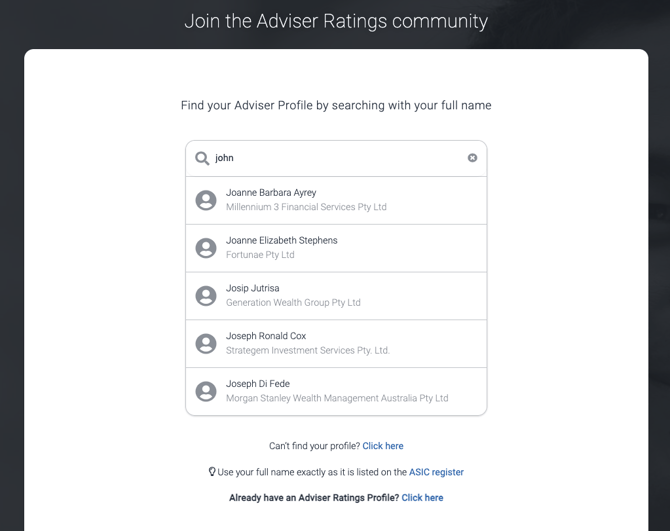
- Review your details sourced directly from ASIC’s Financial Advisers Register
- Select **Set up my account**

*Only active professional listings that are current on [ASIC's Financial Advisers Register (FAR)](https://moneysmart.gov.au/financial-advice/financial-advisers-register)will appear on Adviser Ratings in order for our site to remain in line with the regulator.*
*Any updates to these listings should first be made with ASIC (your licensee can usually do this on your behalf), then the new information will flow through to your Adviser Ratings profile after our next regular update.*
#### **3. Choose your login email username**
You will be asked to choose one of the following:
- Use the business email we have associated with your profile
- If you no longer have access to that email
- Use a different email address
**The email you choose here becomes your permanent username and the address where you will receive all important notifications, including potential client leads.**
*Mobile numbers should not be used as a username.*
*Password recovery support is only available for email-based logins.*
#### **4. Accept the Terms and select “Set up my account”**
On this screen:
- Tick the box to confirm you have read and accepted the Adviser Ratings Terms and Conditions and Privacy Policy
- Select **Set up my account** to continue
******
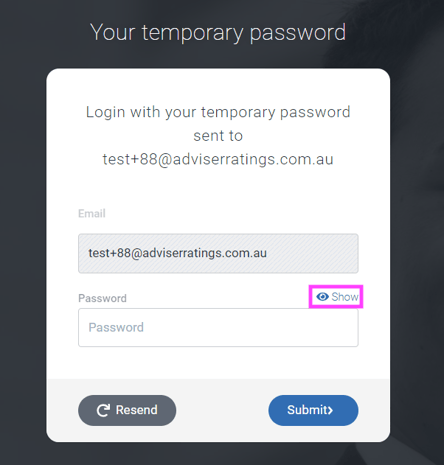
#### **5. Enter your temporary password**
Once you select **Set up my account**:
- A temporary password will be sent to the email address you chose
- Check your junk or spam folder and mark our emails as safe so future messages reach your inbox
Then:
- Enter your temporary password
- Select 'Show' to check for accidental spaces
- Click **Submit**
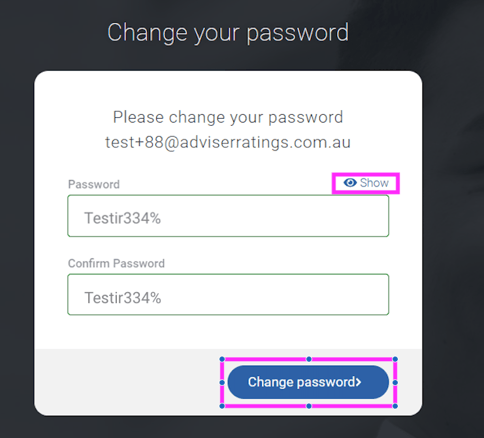
#### **6. Change to your permanent password**
Your new password needs to include:
- At least 8 characters
- Uppercase and lowercase letters
- A number
- A symbol
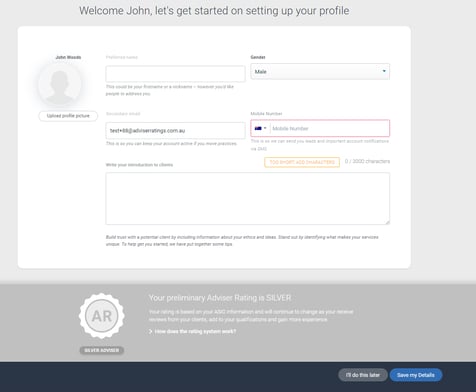
#### **7. Welcome Page**
After creating your password, you will arrive on your Welcome page. From here, you can begin setting up and enriching your Adviser Ratings profile by adding your photo, bio and key details.
### **Next steps**
#### **1. Your claim will be approved by our team**
Your profile does not go live straight away. Our team reviews and approves every claim to ensure it has been submitted by the genuine adviser.
To learn more, see: [**How Adviser Ratings verifies and approves profile claims**](https://info.adviserratings.com.au/en/knowledge/how-adviser-ratings-verifies-and-approves-adviser-profile-claims-?hsLang=en)
Once your claim is approved, you will receive a welcome email confirming your profile is active and ready to update.
#### **2. Start inviting your clients to review you**
Client reviews are one of the best ways to build credibility and strengthen your online presence.
To get started, see: [**How do I invite my clients to review me?**](https://info.adviserratings.com.au/en/knowledge/how-do-i-claim-my-free-profile?hsLang=en)
#### **3. Continue enriching your profile**
You can learn more about your [Adviser Portal and Dashboard](https://info.adviserratings.com.au/en/knowledge/your-adviser-portal-and-dashboard?hsLang=en) and keep enriching your Adviser Ratings profile by:
- [Updating your practice details](https://info.adviserratings.com.au/en/knowledge/update-my-practice-details?hsLang=en)
- [Adding videos](https://info.adviserratings.com.au/en/knowledge/add-video-to-profile?hsLang=en) that showcase your expertise
- Monitoring your profile views and engagement through your dashboard
A complete and regularly updated profile helps you stand out and attract more interest.
#### **4. Logging in next time**
For help accessing your account later, see:
[**How to log into your Adviser Portal**](https://info.adviserratings.com.au/en/knowledge/how-do-i-login-to-my-adviser-portal?hsLang=en)
If you have any questions - our team is ready to help and you can reach us at admin@adviserratings.com.au
- [Your Adviser Ratings Profile](https://info.adviserratings.com.au/en/knowledge/your-adviser-ratings-profile?hsLang=en#main-content)
- [Signing Up](https://info.adviserratings.com.au/en/knowledge/your-adviser-ratings-profile?hsLang=en#signing-up)
- [Logging In](https://info.adviserratings.com.au/en/knowledge/your-adviser-ratings-profile?hsLang=en#logging-in)
- [Passwords and Usernames](https://info.adviserratings.com.au/en/knowledge/your-adviser-ratings-profile?hsLang=en#passwords-and-usernames)
- [Benefits of an Adviser Ratings Profile](https://info.adviserratings.com.au/en/knowledge/your-adviser-ratings-profile?hsLang=en#benefits-of-an-adviser-ratings-profile)
- [Manage Your Reviews](https://info.adviserratings.com.au/en/knowledge/manage-your-reviews?hsLang=en#main-content)
- [Review Management Tools](https://info.adviserratings.com.au/en/knowledge/manage-your-reviews?hsLang=en#review-management-tools)
- [Connect Social Media](https://info.adviserratings.com.au/en/knowledge/manage-your-reviews?hsLang=en#connect-social-media)
- [Reviews Under 2 Stars](https://info.adviserratings.com.au/en/knowledge/manage-your-reviews?hsLang=en#reviews-under-2-stars)
- [Your Adviser Portal and Dashboard](https://info.adviserratings.com.au/en/knowledge/your-adviser-portal-and-dashboard?hsLang=en#main-content)
- [Updating Your Profile](https://info.adviserratings.com.au/en/knowledge/your-adviser-portal-and-dashboard?hsLang=en#updating-your-profile)
- [Resources](https://info.adviserratings.com.au/en/knowledge/your-adviser-portal-and-dashboard?hsLang=en#resources)
- [Your Dashboard](https://info.adviserratings.com.au/en/knowledge/your-adviser-portal-and-dashboard?hsLang=en#your-dashboard)
- [Your Adviser Status Badge](https://info.adviserratings.com.au/en/knowledge/your-adviser-status-badge?hsLang=en#main-content)
- [Education Pathways](https://info.adviserratings.com.au/en/knowledge/your-adviser-status-badge?hsLang=en#education-pathways)
- [Ask An Adviser](https://info.adviserratings.com.au/en/knowledge/ask-an-adviser?hsLang=en)
- [Most Trusted Adviser Designation](https://info.adviserratings.com.au/en/knowledge/most-trusted-adviser-designation?hsLang=en)
- [Adviser Ratings Support Centre](https://info.adviserratings.com.au/blog)
[](https://www.adviserratings.com.au/)
Adviser Ratings Support Centre
Copyright © 2026, The Adviser Ratings Group
```json
{
"@context" : "https://schema.org",
"@type" : "VideoObject",
"caption" : {
"@type" : "MediaObject",
"contentUrl" : "https://info.adviserratings.com.au/media-transcripts/195583776677/en.vtt",
"inLanguage" : "en",
"name" : "en Captions"
},
"contentUrl" : "https://stream.mux.com/nU9fYytrgrcHgyI9NzHxyJEmjE7DcglsIIJmWwQITjs/capped-1080p.mp4",
"dateModified" : "2025-09-04T22:51:45.289Z",
"duration" : "PT1M1S",
"height" : 968,
"name" : "Claim video",
"thumbnailUrl" : "https://5373226.fs1.hubspotusercontent-na1.net/hubfs/5373226/Claim%20video.mp4/medium.jpg",
"uploadDate" : "2025-09-04T22:51:31.795Z",
"width" : 1672
}
```