---
title: How do I invite my clients to review me?
description: Your Adviser Portal allows you to easily invite your clients to review you in bulk or singularly.
---
[Skip to content](https://info.adviserratings.com.au/en/knowledge/how-do-i-invite-my-clients-to-review-me#main-content)
English
Show submenu for translations
![RGB--AR\_Logo--Mark--Large--with-border.png\]](https://info.adviserratings.com.au/hs-fs/hubfs/RGB--AR_Logo--Mark--Large--with-border.png?height=50&name=RGB--AR_Logo--Mark--Large--with-border.png)
- [Adviser Ratings Support Centre](https://info.adviserratings.com.au/blog)
Open main navigation
Close main navigation
- [Adviser Ratings Support Centre](https://info.adviserratings.com.au/blog)
- English
Show submenu for translations
- Contact us
Contact us
Hello. How can we help you?
- There are no suggestions because the search field is empty.
1. [Adviser Ratings Support Centre](https://info.adviserratings.com.au/en/knowledge?hsLang=en)
2. [Manage Your Reviews](https://info.adviserratings.com.au/en/knowledge/manage-your-reviews?hsLang=en)
3. [Review Management Tools](https://info.adviserratings.com.au/en/knowledge/manage-your-reviews?hsLang=en#review-management-tools)
# How do I invite my clients to review me?
## Your Adviser Portal allows you to easily invite your clients to review you in bulk or singularly.
1. Login to your Adviser Portal [here.](https://portal.adviserratings.com.au/login/)
2. Click into 'Reviews'

3. Click into 'Clients' to begin adding to your client list.
***\*NOTE - You may upload up to 25 clients in bulk by creating a .csv list - (See 'Tips for uploading clients').***
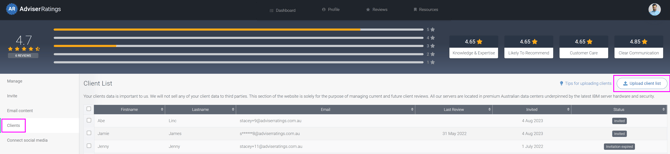
***You may also add clients to your list singularly.***

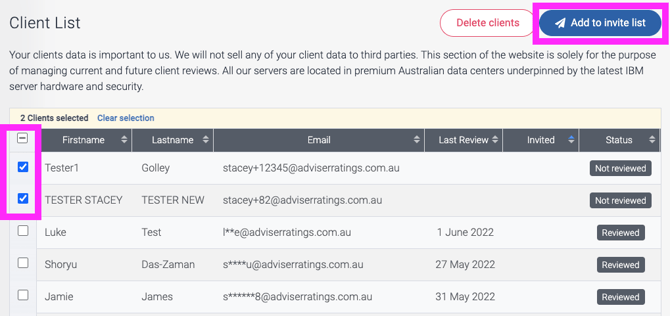
4. Select clients from this client list by clicking the square on the left of each client.
***\*NOTE - Only clients with a valid status can be chosen including******'Not reviewed', 'Pending Invitation', 'Invitation expired' .***
*Clients with a 'Reviewed' status cannot be added to your invite list. 12 months post your client submitting their review will be flagged 'Lapsed review'. You can then re-invite your these clients to review you by following these same steps. Each re-review from that client will appear subsequently below the review on your public profile, highlighting your consistency over time. [Learn More about Lapsed Reviews Here](https://info.adviserratings.com.au/en/knowledge/lapsed-reviews?hsLang=en)*
5. Click 'Add to invite list'
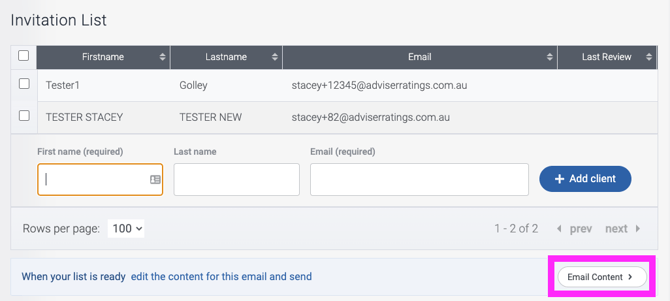
6. Once you have your invitation list ready, click into 'Email Content'
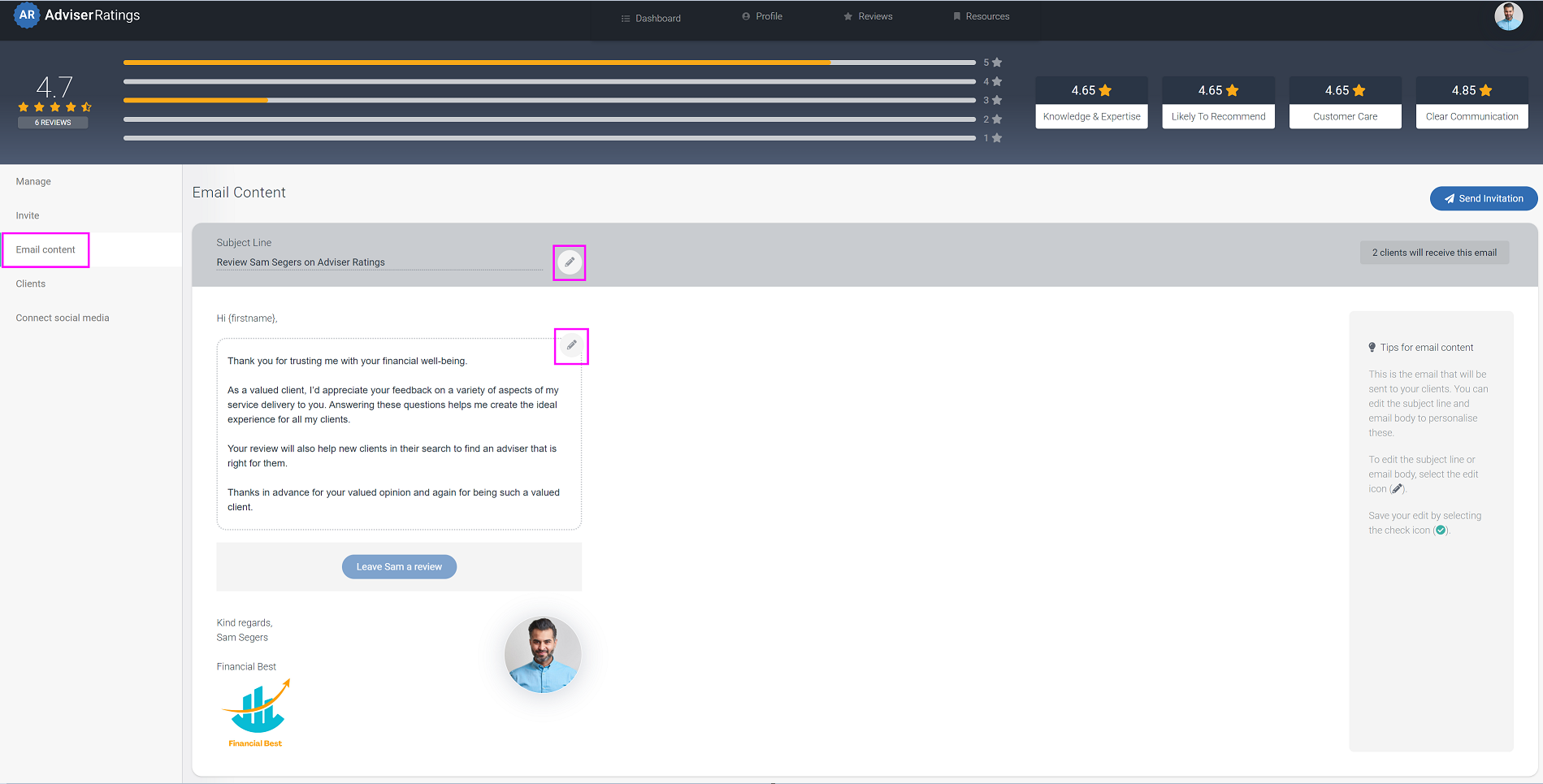
7. You may edit the subject line and content of your email, if you wish.
***\*NOTE - Your client's first name will automatically pull through on the email salutation.***
***Any amendments made are only sent for this email, your amendments to the email text are not saved for further emails.***
**
8. Click 'Send Invitation'

9. Your client will receive your invitation to review email

***\*NOTE - Visit ['Your client's journey to review you'](https://info.adviserratings.com.au/en/knowledge/your-clients-journey-to-review?hsLang=en) video to see how your client receives your review invite email, what questions are asked of them to complete the review. Then how you can respond to and promote your reviews.***
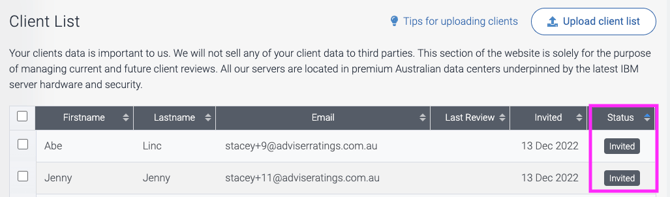
10. Your client will now have an updated status as 'Invited' in your client list and this will change to 'Reviewed' once your client has reviewed you.
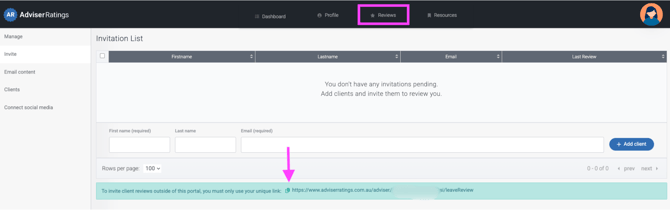
**⚠️ To invite client reviews outside of this portal, you must only use your unique link (see below). This ensures reviews are verified, renewable after 12 months, and meet our compliance standards.**
For more information on managing your reviews, please reach out to admin@adviserratings.com.au
- [Your Adviser Ratings Profile](https://info.adviserratings.com.au/en/knowledge/your-adviser-ratings-profile?hsLang=en#main-content)
- [Signing Up](https://info.adviserratings.com.au/en/knowledge/your-adviser-ratings-profile?hsLang=en#signing-up)
- [Logging In](https://info.adviserratings.com.au/en/knowledge/your-adviser-ratings-profile?hsLang=en#logging-in)
- [Passwords and Usernames](https://info.adviserratings.com.au/en/knowledge/your-adviser-ratings-profile?hsLang=en#passwords-and-usernames)
- [Benefits of an Adviser Ratings Profile](https://info.adviserratings.com.au/en/knowledge/your-adviser-ratings-profile?hsLang=en#benefits-of-an-adviser-ratings-profile)
- [Manage Your Reviews](https://info.adviserratings.com.au/en/knowledge/manage-your-reviews?hsLang=en#main-content)
- [Review Management Tools](https://info.adviserratings.com.au/en/knowledge/manage-your-reviews?hsLang=en#review-management-tools)
- [Connect Social Media](https://info.adviserratings.com.au/en/knowledge/manage-your-reviews?hsLang=en#connect-social-media)
- [Reviews Under 2 Stars](https://info.adviserratings.com.au/en/knowledge/manage-your-reviews?hsLang=en#reviews-under-2-stars)
- [Your Adviser Portal and Dashboard](https://info.adviserratings.com.au/en/knowledge/your-adviser-portal-and-dashboard?hsLang=en#main-content)
- [Updating Your Profile](https://info.adviserratings.com.au/en/knowledge/your-adviser-portal-and-dashboard?hsLang=en#updating-your-profile)
- [Resources](https://info.adviserratings.com.au/en/knowledge/your-adviser-portal-and-dashboard?hsLang=en#resources)
- [Your Dashboard](https://info.adviserratings.com.au/en/knowledge/your-adviser-portal-and-dashboard?hsLang=en#your-dashboard)
- [Your Adviser Status Badge](https://info.adviserratings.com.au/en/knowledge/your-adviser-status-badge?hsLang=en#main-content)
- [Education Pathways](https://info.adviserratings.com.au/en/knowledge/your-adviser-status-badge?hsLang=en#education-pathways)
- [Ask An Adviser](https://info.adviserratings.com.au/en/knowledge/ask-an-adviser?hsLang=en)
- [Adviser Ratings Support Centre](https://info.adviserratings.com.au/blog)
[](https://www.adviserratings.com.au/)
Adviser Ratings Support Centre
Copyright © 2026, The Adviser Ratings Group
```json
{
"@context" : "https://schema.org",
"@type" : "VideoObject",
"contentUrl" : "https://5373226.fs1.hubspotusercontent-na1.net/hubfs/5373226/Invite%20Your%20Clients%20To%20Review%20You.mp4",
"dateModified" : "2022-12-13T21:59:00.427Z",
"duration" : "PT3M4.307S",
"height" : 900,
"name" : "Invite Your Clients To Review You",
"thumbnailUrl" : "https://5373226.fs1.hubspotusercontent-na1.net/hubfs/5373226/Invite%20Your%20Clients%20To%20Review%20You.mp4/medium.jpg",
"uploadDate" : "2022-12-13T21:58:32.002Z",
"width" : 1916
}
```